Displayed prices are for multiple nights. Check the site for price per night. I see hostels starting at 200b/day and hotels from 500b/day on agoda.


kaiser71
-
Posts
781 -
Joined
-
Last visited
Content Type
Profiles
Forums
Events
Everything posted by kaiser71
-
Maybe. You could try reinstalling the card's driver. Sometimes Windows will hang on startup. Do you have enough RAM, CPU, power supply for what you are running? Have reliable antivirus running?
-
Twins
-
http://www.myantispyware.com/2009/06/08/ma...-how-to-fix-it/ Malwarebytes won`t install, run or update – How to fix it If Malwarebytes Anti-malware or any of your security programs won’t install, run or update, then you’ve probably got malware or the effects of malware on the computer (some types of malware will disable Malwarebytes Anti-malware and other security tools). Malwarebytes Anti-malware or any of your security programs won`t install Fix 1: Before saving Malwarebytes Anti-malware or any of your security programs, rename them first. You clicked on a download link and a Save dialog opens. Change file name and click on Save. For example, before you save Malwarebytes Anti-malware, rename mbam-setup.exe to something like mapp.exe (or use any random name) and then click on Save and save it to your desktop. Double Click mapp.exe to install the application. Note: several good names that you can use: explorer.exe, iexplore.exe, firefox.exe, userinit.exe Fix 2: Change Malwarebytes Anti-malware or another security program installation file extension. Turn on “show file extensions for known file types” by doing: Double-click on the My Computer icon. Select the Tools menu and click Folder Options. After the new window appears select the View tab. Put a checkmark in the checkbox labeled Display the contents of system folders. Remove the checkmark from the checkbox labeled Hide file extensions for known file types. Press the Apply button and then the OK button. Now your computer is configured to show file extensions for known file types. Right-click on an installation file (the mbam-setup.exe file for Malwarebytes Anti-malware) and change the .exe extension to .bat, .com, .pif, or .scr. Press Enter and then double-click on it to run. Malwarebytes Anti-malware won`t install or run, it displays a code 2 error box The infection is deleted a core executable (mbam.exe) file of MalwareBytes` Anti-malware. To fix it: Click Run, type %ProgramFiles% and press Enter. Open Malwarebytes’ Anti-Malware Click here to download a Malwarebytes` Anti-malware core executable file with random name. Save the file to the folder above. Run it. Malwarebytes Anti-malware or any of your security programs won`t run Fix 1: Rename the main executable file. Click Run, type %ProgramFiles% and press Enter. Open a home folder of your security program, right-click on the main executable file and click Rename. Type a new name (try explorer.exe or use any random) and press Enter. Double-click on the file to run. An example for Malwarebytes Anti-malware, click Run, type %ProgramFiles% and press Enter. Open Malwarebytes’ Anti-Malware folder, right-click on the mbam.exe file, select Rename, type myapp.exe and press Enter and then double-click on it to run. Fix 2: Boot your computer in the Safe mode. Restart your computer. After hearing your computer beep once during startup, but before the Windows icon appears, press F8. Instead of Windows loading as normal, a menu should appear. Select the first option, to run Windows in Safe Mode. Run Malwarebytes Anti-malware or your security program. Fix 3: Log in Windows using a new created user account. Click Start -> Settings -> Control panel. Click User Accounts and create a new account. Reboot your computer and login Windows using a previously created user account. Run Malwarebytes Anti-malware or your security program. Fix 4: Run TDSSKiller. Probably your computer is infected with TDSS trojan/rootkit. It may block various antivirus and antispyware programs from running. Download TDSSKiller from here and unzip to your desktop. Open tdsskiller folder and run TDSSKiller. Follow the prompts. Malwarebytes Anti-malware won`t run, Windows displays “Windows cannot not access the specified device, path, or file. You may have inappropriate permissions to access the item” error Download this file Save it next to mbam.exe (the file is located in the Malwarebytes Anti-malware home folder). Once done, drag and drop mbam.exe into Inherit.exe. Click OK and attempt to run Malwarebytes Anti-malware once again. Malwarebytes Anti-malware won`t update Fix 1: Manually download and install Malwarebytes Anti-malware update. Download Malwarebytes Anti-malware updates from here or here and save it to your desktop. Double-click on mbam-rules.exe to install. Fix 2: Copy the Malwarebytes Anti-malware definitions (rules.ref) from a clean computer. You can update through MBAM’s interface from a clean computer, copy the definitions (rules.ref) located in C:\Documents and Settings\All Users\Application Data\Malwarebytes\Malwarebytes’ Anti-Malware from that system to a usb stick or CD and then copy it to the infected machine. Cannot use the Internet and download Malwarebytes Anti-malware or another security program You will need access to another computer that has a connection. From the computer download and save a setup package (installation file) to a flash, usb, jump drive or CD. Now transfer it to the infected machine, then install and run the program. If you cannot transfer to or install on the infected machine, try running the setup package (installation file) directly from the flash drive or CD by double-clicking on the file so it will install on the hard drive.
-
Wow, second picture was a shocker.
-
I agree. To a lesser extent, fatwallet.com is also good.
-
He's going to hell.
-
-
Kiss The Sky Ok, this is really weird. Right before I opened this thread I was on imdb looking for this movie. I wanted to bring it up here because it's the only movie I can think of where they show a SEA gogo.
-
John Cusack
-
loved it Alec Baldwin Here's his great speach And a spoof
-
They're just helping you with the Buddhist concept of attachment. You should thank them.
-
-
Hope your bushes are not 2 inches on his property or something. For sure he can't complain about your lawn - looks like golf course turf.
-
Wow, exciting game.
-
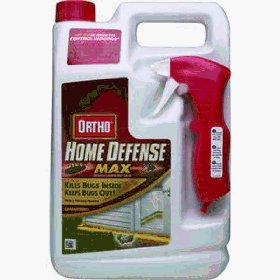
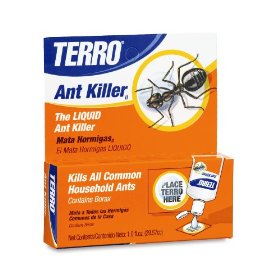
Spraying the perimeter will help keep them out. Spraying the individual ants will scatter the group and create more colonies. Get some ant bait. I hope your problem isn't as bad as this guy This shows how to use the terro bait http://www.youtube.com/watch?v=FP8AsEDkNZI and the ants go nuts over it The spray looks like this The bait looks like this

-
...
-
Second thought. I was assuming my experience in the US would tranfer to Thailand. That was probably stupid. Get a sample of them in a jar. Bring that along with a TG, with a little english, to the home store. There should be a guy working around the pest control stuff familiar with the common local varieties.
-
I thought this was going to be a tech problem. I'll give it a try. You said they are very small. Probably either sugar ants(dark) or ghost ants(light, almost see-thru). Sugar ants march pretty strait. Ghost ants march very irratically. Sugar ants want sugar. Ghost ants seem to want water mostly. You can google "how to get rid of _____ ants" for products you can buy at a homedepot like store. I've used "Terro Ant Killer" ~$4 on both kinds with ok results. You dribble a little on pieces of paper and leave this "bait" in their path. They eat it, take it back to the nest, hopefully the colony dies. There are most likely many colonies. While you're at it, get a gallon of home pest control spray ~ $10. Spray the baseboard all around the perimeter of your condo - paying more attention to windows, doors, and under sinks. Do this once every month or two. But don't spray in their path - this will just alter their route, delaying your victory. Leave for a few hours after application. Good luck. And thanks for all your effort on the condo thread - very informative.
-
Is there really an outcry about the Who @ superbowl?
kaiser71 replied to Obsession's topic in Sports Talk
This says something: http://www.thesmokinggun.com/archive/petetownshend1.html "Townshend was nabbed in January on suspicion of possessing indecent images of children, though no such photos were found following a search of his home and computer." -
Is there really an outcry about the Who @ superbowl?
kaiser71 replied to Obsession's topic in Sports Talk
Never heard about it over here. "The controversy comes from Townshend’s arrest in 2003, when the FBI discovered he was one of 6,000 Britons who accessed and used a credit card on a child-pornography site in Texas. He pleaded guilty following his arrest and, while he was cleared by a subsequent police investigation, his name was placed on a sex offender’s watch list in his home country for five years. Townshend later explained he was sexually abused as a child and, in preparation of a possible autobiography, he was researching how easily child pornography can be accessed online, in order to argue that Internet service providers need to become more vigilant." How is he treated in the UK? Shunned like O.J.? -
Protecting your backup data from prying TGF
kaiser71 replied to MM's topic in Technical problems or questions.
I like the previous suggestion to just go low tech. You could save all your pics to the same directory. At the end of the day add them to a password protected .rar file in a hidden directory. -
That sounds like a parasitic draw problem. Anyone who works on cars and is good with a multimeter should be able to help you. Page 5 of this pdf outlines the procedure: http://ww2.justanswer.com/uploads/dinotapi...system_test.pdf
-
Expats advise on Rental Car and Motorcycle Rental Business
kaiser71 replied to pattayafun's topic in Expat Issues
sorry, double post. -
Expats advise on Rental Car and Motorcycle Rental Business
kaiser71 replied to pattayafun's topic in Expat Issues
These are fixed costs. "If your outgo exceeds your income, your overhead will be your downfall." -
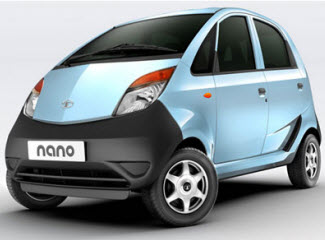
The Tata Nano is coming soon to Thailand. Bt80,000-150,000. "The car has a maximum speed of 85 kilometres per hours, consumes one litre of gasoline every 22 kilometres.." http://enews.mcot.net/view.php?id=10199